- Find the token. Search by name, ticker or issuer address with Search Token or CA at the top of the site, or browse Tokens. Open the token to see its page.
- Choose Buy. In the trade panel, make sure Buy is selected (the order type defaults to Swap, which buys straight away at the market price; Limit lets you set your own price).
- Enter an amount in XRP under Amount to buy, or tap one of the preset amounts (10, 50 or 100 XRP by default). You can change the presets with the pencil icon: see Preset Buys.
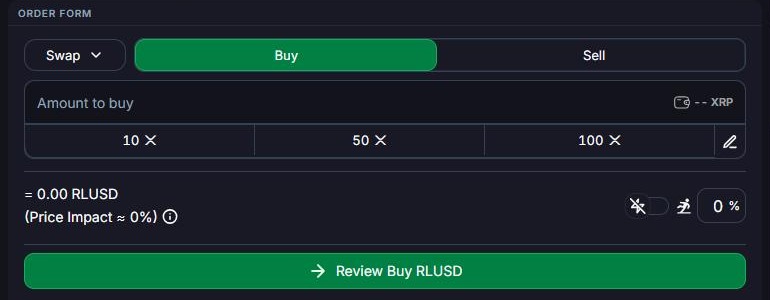
- Check your slippage and price impact. The slippage box (marked %) is the most the price may move before your trade fills. Price Impact shows how much your own order moves the price. If your slippage is too low for the trade, the button changes to Slippage Too Low: raise it or reduce your amount. See Slippage.
- Review and confirm. Click Review Buy (ticker), check the details, then click Confirm. Your wallet signs the trade on your device and it settles on the XRP Ledger in a few seconds.
Quick trades: the lightning toggle next to the slippage box turns on quick execution. The button then reads Quick Buy (ticker) and trades in one click, without the review step. Use it only when you're sure of your settings.
Quick Buy from the token list: on Tokens, open Customize → View and turn on Enable Quick Buy to buy any token straight from the list with a set XRP amount.
The first time you buy a token, First Ledger also sets up its trust line, which holds 0.2 XRP of reserve while you own it. See the FAQ for how to get it back.
To check your balance, click the wallet button at the top right.